
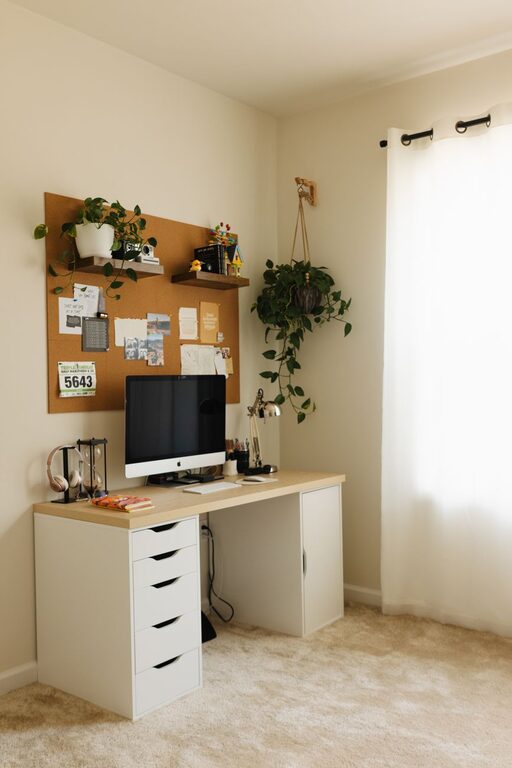
Creating a home office that is both cozy and productive can make a significant difference in your workday. Whether you work from home full-time or occasionally need a quiet spot to focus, designing a space that supports your needs is essential. In this post, we’ll share practical tips to help you set up a home office that feels comfortable, encourages productivity, and suits your style.
Choose the Right Location
Selecting the right spot in your home is the first step. Ideally, find a space where distractions are minimal. This could be a quiet corner in a spare room or a nook near a window.
– Natural light: Position your desk near a window to benefit from natural light. It helps to boost your mood and reduce eye strain.
– Privacy: Ensure the space is away from household traffic and noise, allowing you to focus better.
Invest in Comfortable Furniture
Comfort is key to working productively without physical strain.
– Ergonomic chair: Choose a chair that supports your back and promotes good posture. Adjustable features are a plus.
– Desk size: Pick a desk that fits your work essentials but doesn’t overcrowd the room. Enough surface area to spread out without clutter helps keep you organized.
Organize Your Space Efficiently
An organized workspace reduces stress and saves time.
– Storage solutions: Use shelves, drawers, or filing cabinets to keep documents and supplies tidy.
– Desk organizers: Consider pen holders, cable management boxes, and other tools to keep your desk clutter-free.
– Declutter regularly: Set aside time each week to clean and reorganize your workspace.
Personalize Your Workspace
Adding personal touches can make your office feel welcoming and inspiring.
– Decor: Include items you enjoy, like plants, photos, or artwork, but avoid overdecorating.
– Colors: Choose calming or motivating colors for your walls and accessories. Light blues, greens, or neutrals often work well.
– Lighting: Combine natural light with warm, adjustable lighting to keep your space bright and cozy during evenings.
Incorporate Technology Wisely
Having the right technology setup can enhance your productivity.
– Reliable internet: Ensure a strong internet connection to avoid interruptions.
– Hardware: Invest in good quality monitors, keyboards, and headsets to improve comfort.
– Cable management: Use clips or sleeves to keep cords tidy and out of the way.
Set Boundaries and Routines
Defining clear work hours and routines helps maintain balance.
– Dedicated work time: Stick to a schedule that sets clear work periods and breaks.
– Separate work and relaxation: When your workday ends, physically leave your home office space if possible, to help your brain switch off.
Add Comfort and Wellness Elements
Your physical and mental well-being are important for sustained productivity.
– Ergonomic accessories: Footrests, wrist supports, or anti-fatigue mats can reduce strain.
– Air quality: Fresh air or an air purifier keeps the space comfortable.
– Break area: If space allows, have a small corner for stretching or relaxing briefly.
Experiment and Adjust
Your ideal home office setup might take some trial and error.
– Listen to your needs: Notice when you feel most comfortable and focused, then adjust lighting, seating, or layout accordingly.
– Stay flexible: Don’t hesitate to rearrange or upgrade elements over time.
—
Building a cozy and productive home office doesn’t require a large budget or extensive renovations. By focusing on comfort, organization, and personalization, you can create a space that helps you work efficiently and enjoyably. Start small and make changes step-by-step to find the setup that works best for you. Happy working!